
How to Buy a Gaming PC in India Under ₹1.5 Lakh
Gaming PCs have become increasingly popular in India as gamers seek high-performance systems capable of handling AAA titles, esports games, streaming, and content creation. If your budget is around ₹1.5 lakh, you’re in an excellent position to build or buy a gaming PC that delivers outstanding performance for years.
However, many buyers make costly mistakes by choosing the wrong processor, overspending on RGB components, or neglecting essential hardware such as cooling and power supplies.
This comprehensive guide will help you understand how to buy a gaming PC in India under ₹1.5 lakh, ensuring maximum value and performance for your investment.
Why ₹1.5 Lakh Is the Sweet Spot for Gaming PCs
A budget of ₹1.5 lakh allows you to:
- Play modern AAA games at Ultra settings
- Enjoy smooth 1440p gaming
- Experience high refresh rates (144Hz–240Hz)
- Stream gameplay on platforms like YouTube and Twitch
- Perform video editing and content creation
- Future-proof your gaming setup
This budget strikes the perfect balance between affordability and premium gaming performance.
Step 1: Define Your Gaming Requirements
Before purchasing a gaming PC, identify your primary usage.
Casual Gaming
Games like:
- Valorant
- CS2
- Fortnite
- League of Legends
- Buy a Gaming PC in India Under ₹1.5 Lakh
Require less powerful hardware.
AAA Gaming
Games like:
- Cyberpunk 2077
- Black Myth: Wukong
- GTA VI
- Starfield
- Red Dead Redemption 2
Need a stronger GPU and processor.
Gaming + Streaming
If you plan to stream gameplay, invest in:
- More RAM
- Better CPU
- Efficient cooling
Step 2: Allocate Your Budget Wisely
For a ₹1.5 lakh gaming PC, budget allocation is crucial.
| Component | Budget Allocation |
|---|---|
| Graphics Card | ₹55,000–₹70,000 |
| Processor | ₹20,000–₹30,000 |
| Motherboard | ₹10,000–₹15,000 |
| RAM | ₹8,000–₹12,000 |
| SSD | ₹5,000–₹8,000 |
| Power Supply | ₹6,000–₹10,000 |
| Cabinet | ₹4,000–₹8,000 |
| Cooling | ₹3,000–₹8,000 |
The graphics card should receive the largest portion of your budget because gaming performance depends heavily on GPU power.
Step 3: Choose the Right Processor
The CPU is the brain of your gaming PC.
Best AMD Processors
AMD Ryzen 7 7700
Benefits:
- Excellent gaming performance
- Power efficient
- Strong multitasking capabilities
AMD Ryzen 5 9600X
Ideal for:
- Competitive gaming
- Budget-conscious buyers
Best Intel Processors
Intel Core i5-14600K
Advantages:
- High gaming FPS
- Excellent productivity performance
- Great for streaming
Intel Core i7-14700F
Perfect for:
- Gaming
- Video editing
- Heavy multitasking
Step 4: Select a Powerful Graphics Card
The GPU is the most important component in a gaming PC.
Best Graphics Cards Under ₹1.5 Lakh Budget
NVIDIA GeForce RTX 4070 Super
Features:
- Excellent 1440p gaming
- DLSS 3 support
- Ray tracing capabilities
NVIDIA GeForce RTX 5070
Benefits:
- Future-ready architecture
- Improved AI performance
- Better efficiency
AMD Radeon RX 7800 XT
Advantages:
- Great price-to-performance ratio
- High VRAM capacity
- Strong rasterization performance
Step 5: Choose the Right Motherboard
Many buyers overlook the motherboard, but it determines upgrade potential.
For AMD Builds
Recommended chipsets:
- B650
- B650E
Popular choices:
- MSI B650 Gaming Plus
- Gigabyte B650 Eagle
- ASUS TUF B650 Plus
For Intel Builds
Recommended chipsets:
- B760
- Z790
Popular models:
- MSI B760 Tomahawk
- ASUS TUF B760 Gaming WiFi
Step 6: Install Adequate RAM
Modern games require substantial memory.
Recommended
- 32GB DDR5 RAM
- 6000MHz speed
- CL30 or CL32 latency
Benefits:
- Smooth gameplay
- Better multitasking
- Future-proofing
Avoid buying 16GB if your budget allows 32GB.
Step 7: Buy a Fast SSD
Traditional hard drives are no longer ideal for gaming.
Recommended Storage
Primary Drive
- 1TB NVMe Gen4 SSD
Examples:
- WD Black SN850X
- Samsung 990 EVO
- Crucial T500
Optional Secondary Storage
- 2TB HDD
- Additional SSD
Step 8: Don’t Ignore the Power Supply
A quality PSU protects expensive components.
Recommended PSU
- 750W Gold Rated
- Fully Modular
Trusted brands:
- Corsair
- Cooler Master
- MSI
- DeepCool
- Seasonic
Avoid cheap power supplies as they can damage your PC.
Step 9: Choose an Airflow-Focused Cabinet
Good airflow improves temperatures and component lifespan.
Look for:
- Mesh front panel
- Dust filters
- Multiple fan support
- Cable management space
Popular options:
- Corsair 4000D Airflow
- DeepCool CH560
- NZXT H5 Flow
- Montech Air 903 Max
Step 10: Invest in Proper Cooling
Gaming generates significant heat.
Air Cooling
Recommended:
- DeepCool AK620
- Thermalright Peerless Assassin
Liquid Cooling
Recommended:
- DeepCool LS720
- Cooler Master Atmos 360
Choose cooling based on your processor’s thermal requirements.
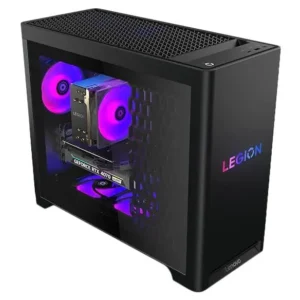
Recommended Gaming PC Build Under ₹1.5 Lakh
AMD Gaming Build
| Component | Recommendation |
|---|---|
| CPU | AMD Ryzen 7 7700 |
| GPU | RTX 4070 Super |
| Motherboard | B650 Gaming Motherboard |
| RAM | 32GB DDR5 6000MHz |
| Storage | 1TB NVMe Gen4 SSD |
| PSU | 750W Gold |
| Cabinet | Airflow Cabinet |
| Cooler | DeepCool AK620 |
Expected Cost:
₹1.40–₹1.50 Lakh
Expected Gaming Performance
1080p Gaming
| Game | FPS |
|---|---|
| Valorant | 300+ |
| CS2 | 250+ |
| Apex Legends | 200+ |
| Fortnite | 180+ |
1440p Gaming
| Game | FPS |
|---|---|
| Cyberpunk 2077 | 100+ |
| Hogwarts Legacy | 120+ |
| Call of Duty Warzone | 140+ |
| Forza Horizon 5 | 160+ |
Performance varies depending on settings and updates.
Common Mistakes to Avoid
Buying a Weak GPU
Never spend more on RGB than on your graphics card.
Choosing Cheap PSU
A low-quality PSU can cause hardware failure.
Ignoring Airflow
Poor cooling leads to thermal throttling.
Buying DDR4 for New Builds
DDR5 offers better long-term value.
Overspending on Aesthetics
Performance should always take priority over looks.
Where to Buy Gaming PCs in India
Popular online platforms include:
- Amazon India
- Flipkart
- MD Computers
- PrimeABGB
- Vedant Computers
- EliteHubs
Always compare prices before purchasing.
Final Thoughts
A gaming PC under ₹1.5 lakh in India can deliver exceptional gaming performance, smooth streaming, and long-term upgrade potential. Prioritize the graphics card, pair it with a capable processor, invest in quality cooling and power delivery, and avoid unnecessary spending on cosmetic upgrades.
By carefully selecting the right components, you can build a future-ready gaming PC that handles modern games at high settings while staying within your ₹1.5 lakh budget. This approach ensures the best balance of performance, reliability, and value for Indian gamers in 2026.
